
Creating Reply Templates
After creating a task, the AI needs "Reply Templates" to generate specific comment responses. Templates define the language style, persona, and content framework for the AI's replies.
This guide will show you how to create an effective reply template.
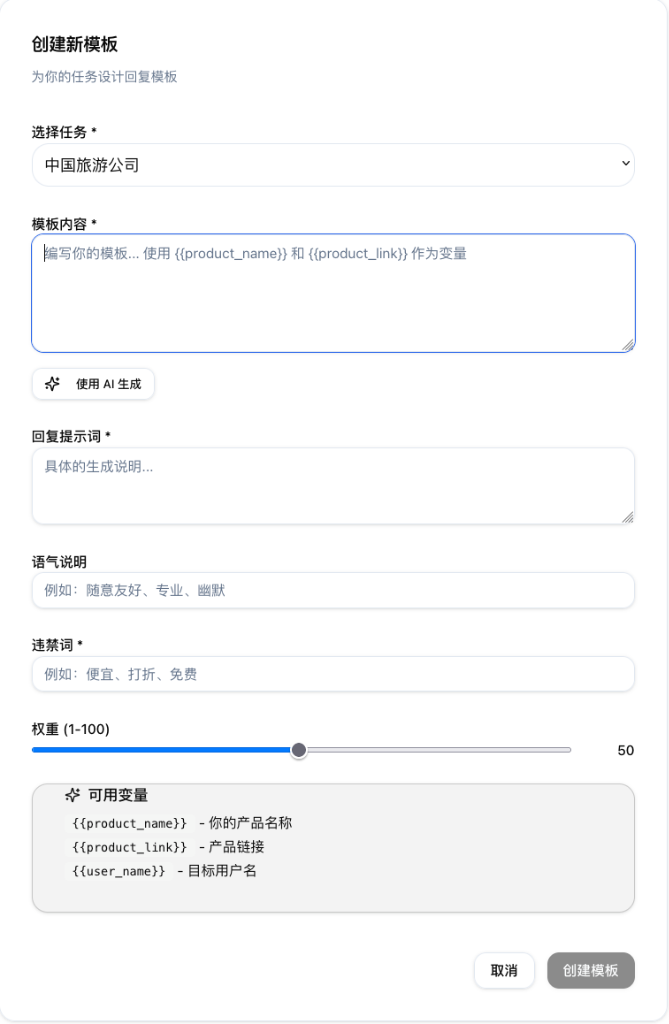
Parameters Breakdown
1. Select Task Required
- Link this template to a specific task. When executing that task, the AI will use this template randomly or based on weight.
2. Template Content Required
- This is the basic skeleton of the reply. You can input a sample text for the AI to reference.
- Variables: Supports variables like
which the AI automatically replaces with actual task data during generation.
3. Reply Prompt Required Core
- This is the "script" and "instruction" for the AI. It tells the AI who it is and how it should speak.
- Persona Settings: Define the AI's identity, which determines credibility.
- 🎩 Industry Veteran: Expert tone, professional vocabulary, identifying pain points.
- 🛍️ Real User/Buyer: Sharing personal experience, casual tone, subjective emotions.
- 🚶 Passerby: Neutral perspective, curious questions, or simple agreement.
- 💼 Honest Merchant: Sincere recommendation, confident but not arrogant.
- Content Instructions: Provide core product data (price, exclusive features) and reply techniques (e.g., "empathize then recommend").
4. Tone
- Set the overall emotional baseline, e.g., Casual, Professional, Humorous, or Controversial.
5. Negative Keywords
- Words that must absolutely NOT appear in replies generated from this template (e.g., competitor names, prohibited terms).
6. Weight (1-100)
- Determines the probability of this template being selected. Higher weight means it appears more frequently in interactions.
💡 Expert Tip: Creating "Human-Like" Replies
To avoid robotic responses, add the following instructions in the [Reply Prompt]:
- Use Slang: Instruct the AI to use authentic slang relevant to the target region (e.g., "OP", "Based", "Lit" on Reddit).
- Intentional "Imperfections": Instruct the AI to include slight grammatical errors, abbreviations, or non-disruptive typos to simulate a real mobile typing experience.
- Example Instruction: "Type like a busy office worker on a phone, keep it brief, and include occasional spelling slips."
Imperfections make the reply feel more authentic and easier for the community to accept!