
Creating Your First Task
This guide walks you through the process of creating an automated marketing task in the GlanceMind dashboard using a step-by-step visual method. The task creation flow consists of three stages: Basic Information, AI Strategy, and Budget & Schedule.
Step 1: Basic Information
In this step, you define your target audience and search scope.
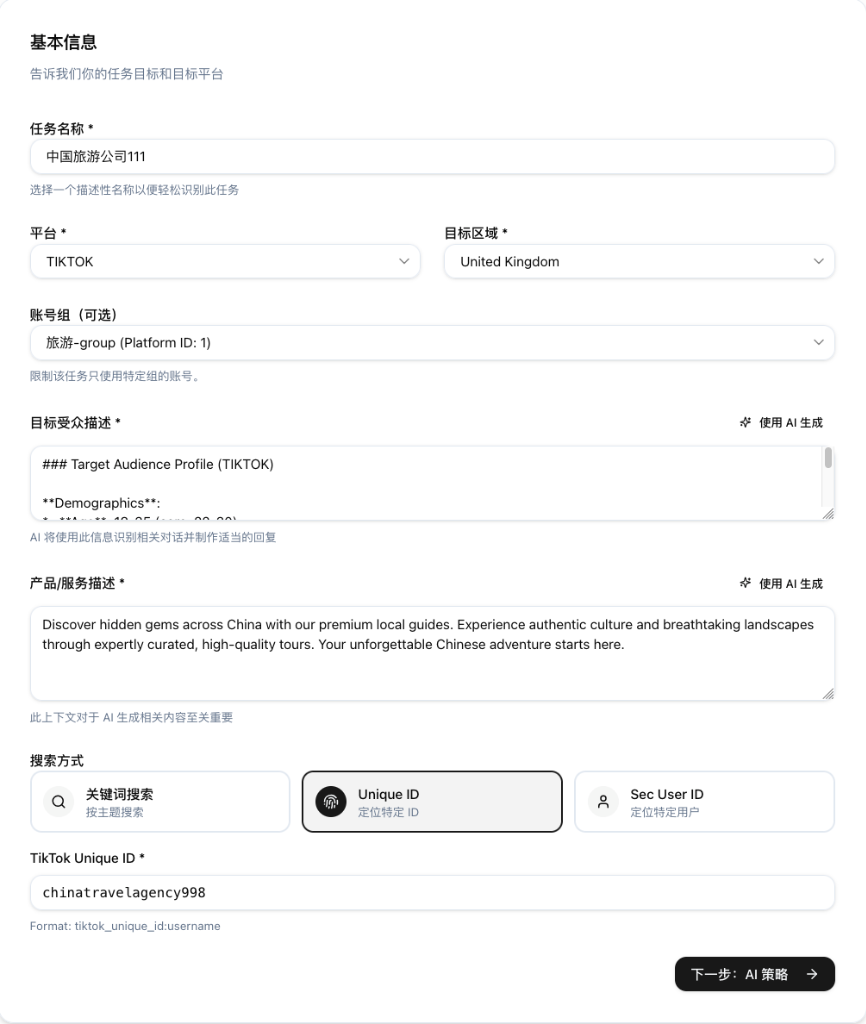
Key Parameters
- Task Name
Required- A descriptive name for your reference (e.g., "China Tour Promo - Reddit").
- Platform
Required- Select the target social platform (e.g., Reddit, TikTok). The executor will run operations for this platform.
- Region
Required- Target geographical region. This influences the AI's cultural context and tone.
- Account Group
Optional- Specify which group of accounts will execute this task.
- 👉 How to create? See Social Account Management.
- If left blank, available accounts may be used based on system policy.
- Target Audience
RequiredAI-Generatable- Describe your ideal customer (age, gender, interests, etc.).
- Purpose: The AI uses this to filter comments and identify potential leads.
- Product/Service Description
RequiredAI-Generatable- Detail your product's selling points.
- Purpose: This is the knowledge base for the AI. It extracts value propositions from here to generate replies.
💡 Pro Tip: Optimize with AI
After filling in the details for Target Audience and Product/Service Description, we strongly recommend clicking the "✨ Use AI Generate" button in the top-right corner of the input box.
The AI will rewrite your input into a structured, optimized prompt that enhances the underlying model's understanding, leading to significantly better interaction results and reply quality!
- Search Method
TikTok Only- Keyword Search: Traditional topic/keyword-based search.
- Unique ID: Targeted monitoring of specific creators (via public Handle ID).
- Sec User ID: Targeted monitoring of specific creators (via system-specific Sec UID, more stable).
- Keyword/ID
RequiredAI-Generatable- Enter search keywords or paste target creator's ID.
- Format Guide:
- Keyword: Enter keywords directly (e.g.,
travel china). - Unique ID: Enter
[prefix]:[id]format (e.g.,tiktok_unique_id:chinatravel). - Sec User ID: Enter
[prefix]:[id]format (e.g.,tiktok_sec_user_id:MS4wLj...).
- Keyword: Enter keywords directly (e.g.,
- Tip: In edit mode, the system will automatically switch to the corresponding tab based on the prefix of your pasted content.
Step 2: AI Strategy
Configure the AI model behavior and automated interaction rules.
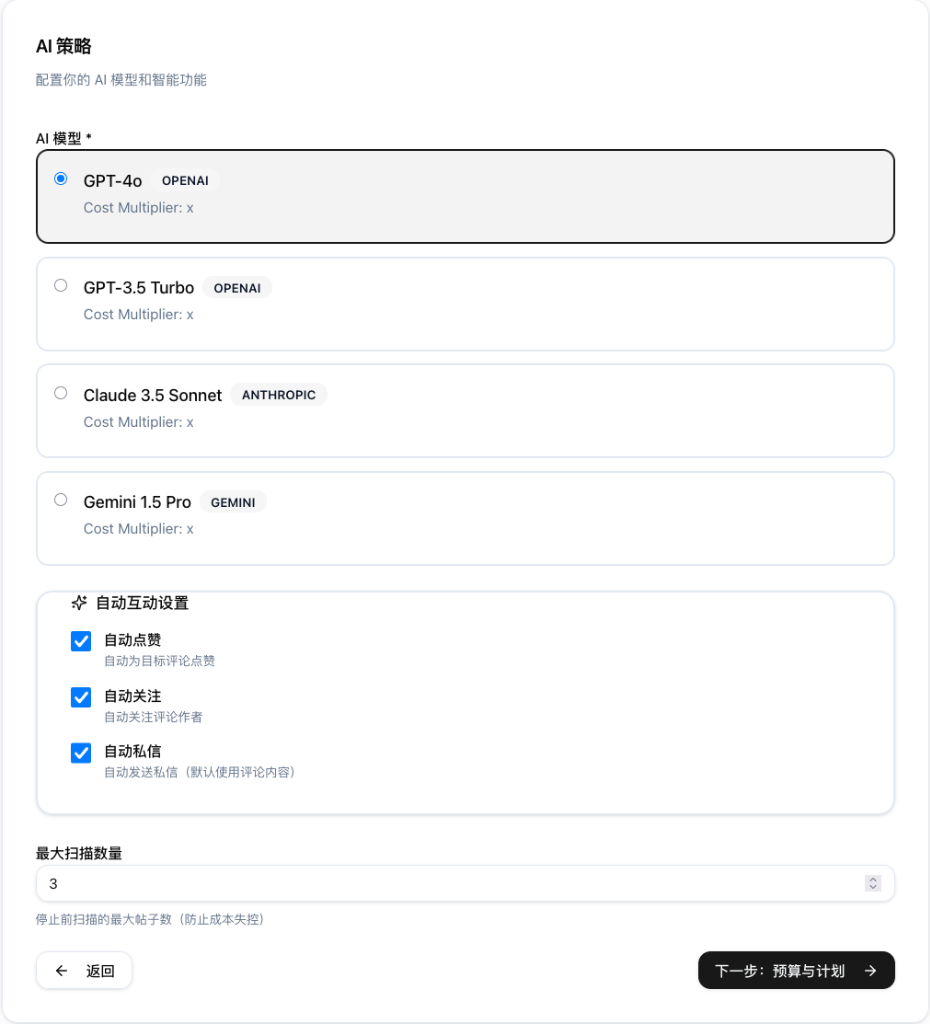
Key Parameters
- AI Model
Required- Choose the underlying Large Language Model (e.g., GPT-4o, Claude 3.5 Sonnet). Different models have different cost multipliers.
- Auto Interaction Settings
- ✅ Auto Like: Automatically like comments deemed high-value by the AI.
- ✅ Auto Follow: Automatically follow users identified as high-intent leads.
- ✅ Auto DM: (High Risk) Automatically send Direct Messages. Recommended to keep OFF to avoid spam detection.
- Max Scan Count
- Limits the total number of posts/comments processed in this task run to control volume.
Step 3: Budget & Schedule
Finally, set the execution frequency and budget limits.
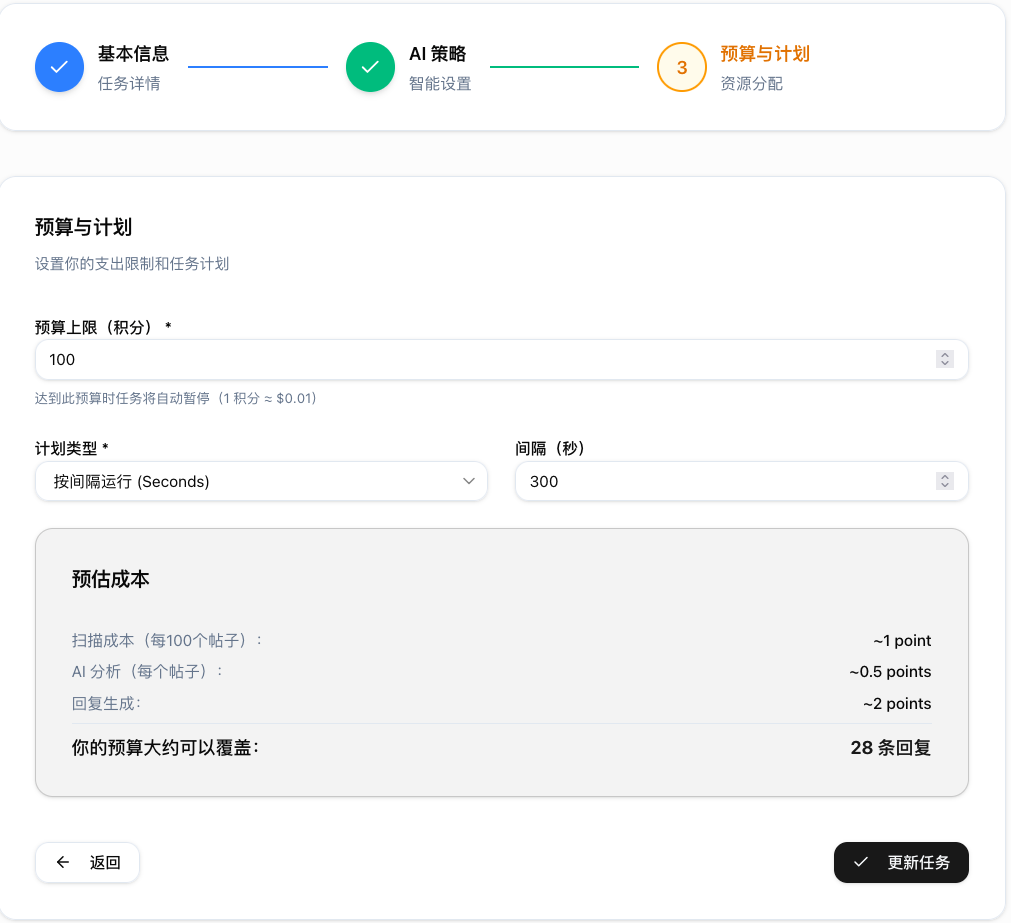
Key Parameters
- Budget Cap (Points)
Required- Set a maximum limit for point consumption (e.g., 100 points).
- Auto-Stop: The task pauses automatically when this limit is reached to prevent overspending.
- Schedule Type
Required- Typically set to "Interval" for recurring execution.
- Interval (Seconds)
- The wait time between execution cycles. For example,
300means the executor checks for new content every 5 minutes.
- The wait time between execution cycles. For example,
Estimated Cost
The bottom panel calculates real-time cost estimates based on your selected AI model:
- Scan Cost: Cost for data scraping.
- AI Analysis: Cost for analyzing user intent.
- Reply Generation: Cost for generating response text.
- Coverage Est.: An estimate of how many interactions your budget can cover.