
Social Account Management
To execute automated tasks (like auto-liking and replying), you need to configure a Social Account Pool. GlanceMind manages these accounts via Account Groups, ensuring flexibility and security.
Process Overview
- Create Account Group
- Add Social Accounts
- Associate Accounts with Group
- Use Group in Tasks
Step 1: Create Account Group
An account group is the basic unit for management. It is recommended to group accounts by business line or platform, e.g., "TikTok-US-Travel" or "Reddit-Tech-Promo".
- Go to the Account Groups page.
- Click "Create Group".
- Enter a group name and save.
Step 2: Add Social Account
Next, import your prepared social platform accounts.
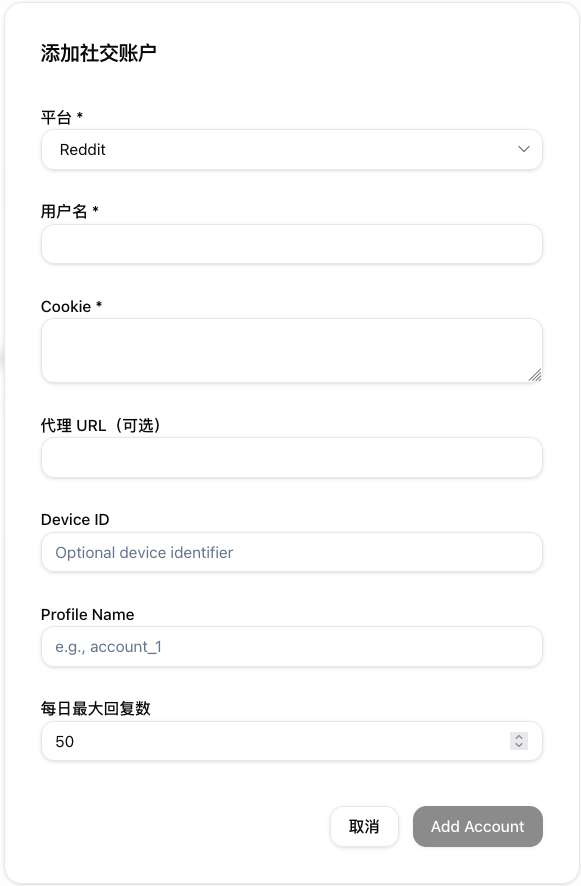
Parameters Breakdown
- Platform
Required- Select the platform (e.g., Reddit, TikTok).
- Username
Required- Login name or display name, used for dashboard identification.
- Cookie
DeprecatedOptional- This field is deprecated in the current version. You can fill it with any random text.
- Proxy URL
OptionalDeprecated- This field is deprecated in the current version. You can leave it blank or fill with random text.
- Device ID
Optional- Unique device identifier generated in the local executor tool. If this account is bound to a specific device, enter the UUID here.
- 👉 Corresponds to
executor.uuid. See Executor Manual - Config Details.
- Profile Name
Optional- Matches the folder name in the local executor's
profilesdirectory (e.g.,account_1). Ensures the program loads the correct browser fingerprint. - 👉 Each profile corresponds to a browser session. See Executor Manual - Login.
- Matches the folder name in the local executor's
- Max Daily Replies
- Safety threshold. The account will stop replying for the day once this limit is reached to protect account health.
Step 3: Link Account to Group
- When creating or editing an account, select the target Account Group.
- Alternatively, go to the Account Group Details page and add existing accounts to the group.
Step 4: Use in Task
Once configured, you can use this group when creating a task.
- Go to the Create Task page.
- In the "Account Group" dropdown, select the group you just created.
- The system will automatically dispatch idle accounts from this group to execute the task.